
After the genome issue, a lot of you wanted the same thing, and it wasn't the genome. It was the folder I dropped it into: my Health OS. "How do I build one?"
My friend Max Barbier didn't wait for instructions. He built his own in a day:
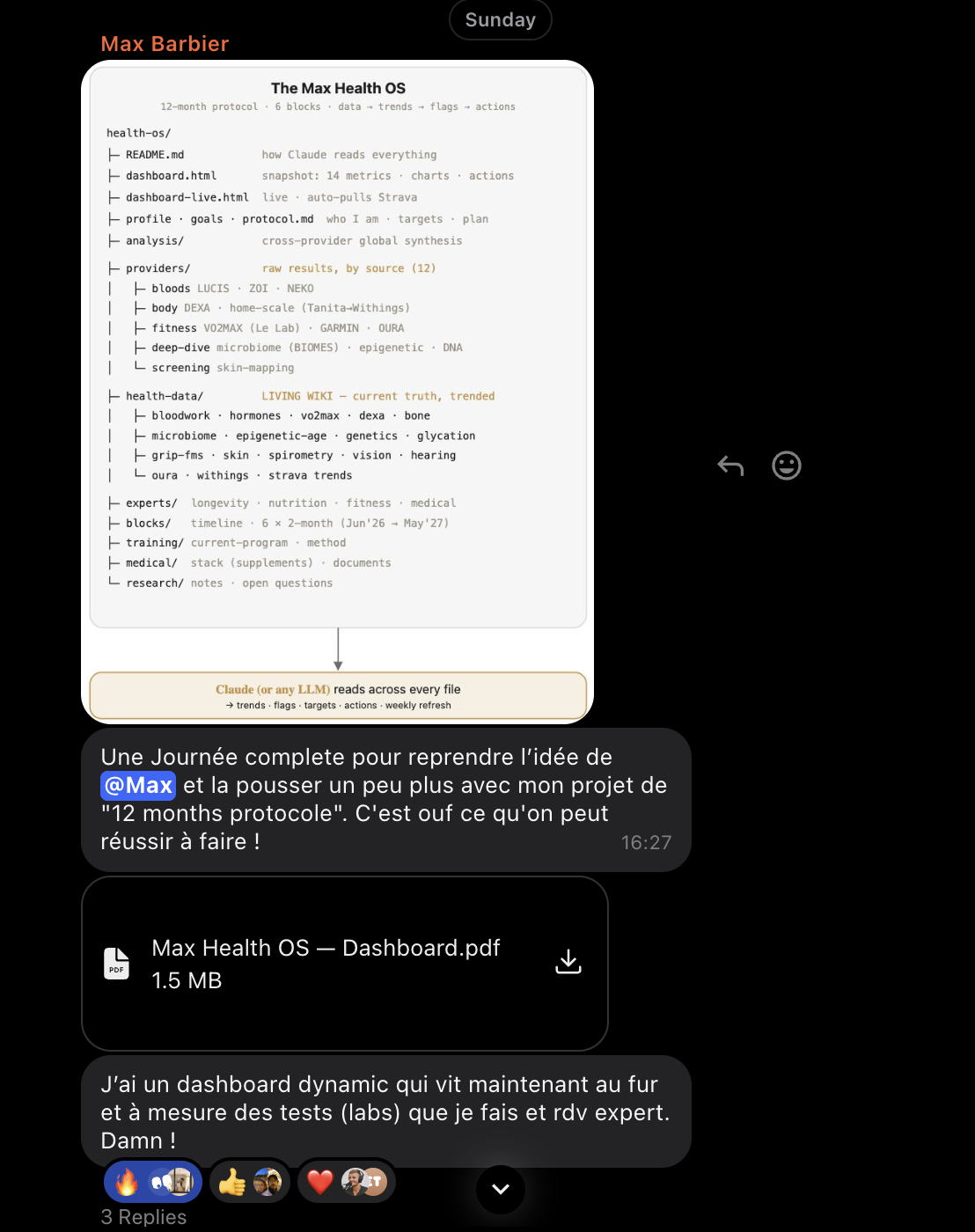
So here's where it came from, and how to build yours.
It started with one tweet. In April, Andrej Karpathy posted about a simple folder of text files an AI can read[1]. It clicked: this was how I'd finally make sense of my scattered health data.
Bryan Johnson built his own off the same post[2]. When he and a guy in Paris build the same thing off one tweet, that's where this is going.
By the end, you'll have your own.
What a Health OS is
It's simple, almost stupidly so.
A folder on your computer, one plain text file per part of your health: bloodwork, wearables, genome, family history.
And you keep adding to it. Every new lab, every month of wearable data stacks on top of the last. The files aren't a snapshot. They're a record that gets longer and richer over time.
The folder lives on your machine. You open it in your AI tool whenever you want, and it reads across all of it at once, the whole history, every source, and turns it into decisions.
No app, no dashboard, no code.
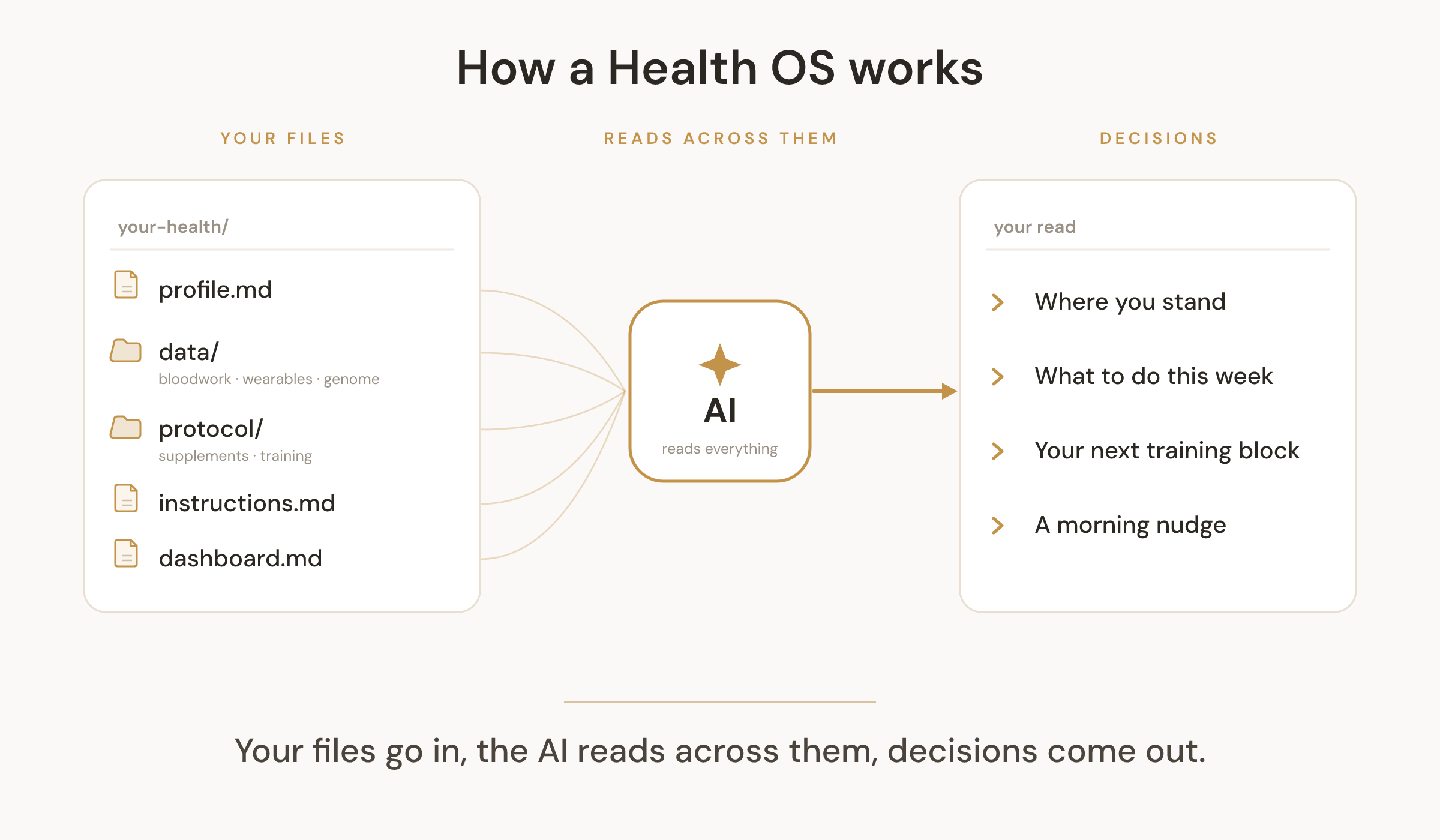
I had years of data. Nothing read it together.
For years it piled up, in two speeds.
The daily stuff: Whoop on my sleep and recovery, Withings on my weight, Strava on every run and workout.
And the bigger tests, more like once a year: bloodwork from Lucis (the company I built), a body composition scan, my genome, my family's health test results.
Good data, all of it. But each source only ever saw its own slice.
My Whoop didn't know my iron stores were low. My bloodwork didn't know I'd trained hard all week. Nothing looked at the whole thing.
That's the gap AI closes.
It reads across plain, messy files from every source and finds what no single one can see on its own. No database, no integrations.
You hand it your text, and it reasons over all of it at once. The data you already have is enough. It just needs one reader that sees all of it.
Then it stopped being a folder and became a system
I started simple. Dumped everything into the folder and started asking questions. It worked right away, ask anything, get an answer across all my data at once. Things no single app could see.
But I wanted to push it further. The folder was already great. It got better the more current it stayed, and the moment it updated itself every day, it started getting more useful every day too.
The friction was keeping it current by hand. Every Sunday I'd sit down to plan my training, and first I had to:
- pull in my latest data myself, Whoop, Strava, Withings
- merge it into everything else
- then actually plan
It worked. But it ate time, every single week.
So I automated it.
And here's the part I still can't quite believe: I didn't write a single line of it. I told Claude Code what I wanted, and it built the whole thing, the scripts, the integrations, all of it.
Now it runs on its own:
- Whoop, Withings, and Strava flow in automatically
- it keeps itself current and spots trends on fresh data instead of an old snapshot
- the only thing I still add by hand is the deep tests, and those come once a year anyway
Then I took it one step further. I had Claude Code wire it into a Telegram bot, Max Health Coach. Now it comes to me:
- every morning, on its own
- how ready I am, the workout for the day, a nudge when something's off
- I don't open a folder or ask anymore. It just shows up.
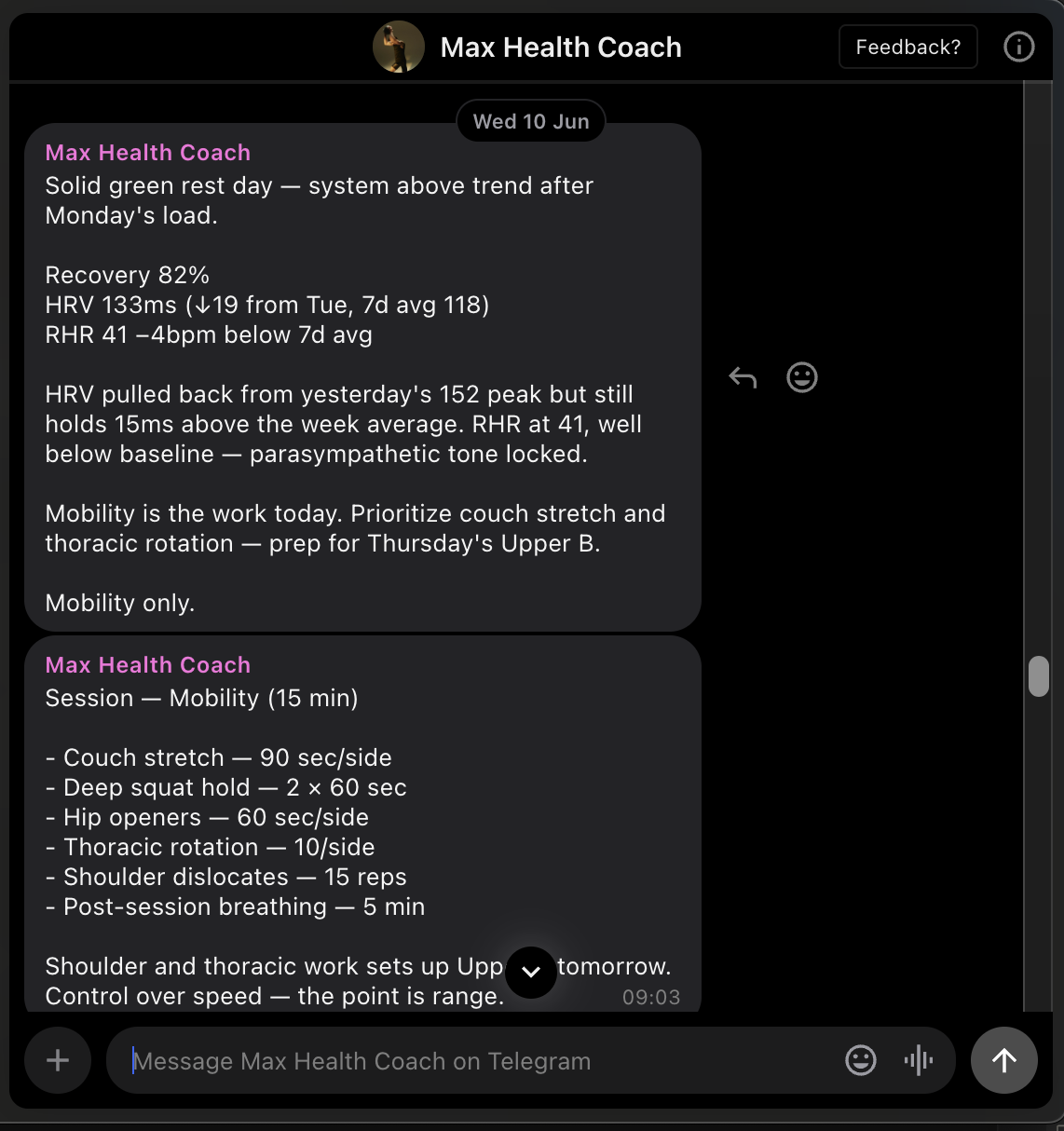
That's the whole arc:
And I never touched the code.
Why you'd build one too
A few months in, here's what it actually buys me.
- Safer decisions. Before anything new goes in my body, a new drug, a supplement, a new protocol, I run it against my own data first. I did exactly that before starting retatrutide, a drug in the same family as Ozempic that I'm experimenting with.
- Genuinely data-driven. I can ask "how is my retatrutide experiment actually going?" and it reads everything at once: resting heart rate, HRV (a read on how recovered I am), weight, my training, my bloodwork. The data tells me, not a hunch.
- Time and money saved. And honestly, it's made me lean on a doctor less for the day-to-day. Not for anything that genuinely needs one, but the small "should I tweak this?" calls I used to book an appointment for, I just ask my own data now.
If you measure anything about your health, this is what turns the numbers into decisions.
How to set it up, no code
You don't need the automation to start, that came later. If you can edit a text file and paste a prompt, you can do this.
1. Pick a tool that reads a folder. Claude (Cowork or Claude Code), OpenAI Codex, any AI tool that lets you open a folder from your computer and ask questions about the files inside. Free tiers are fine.
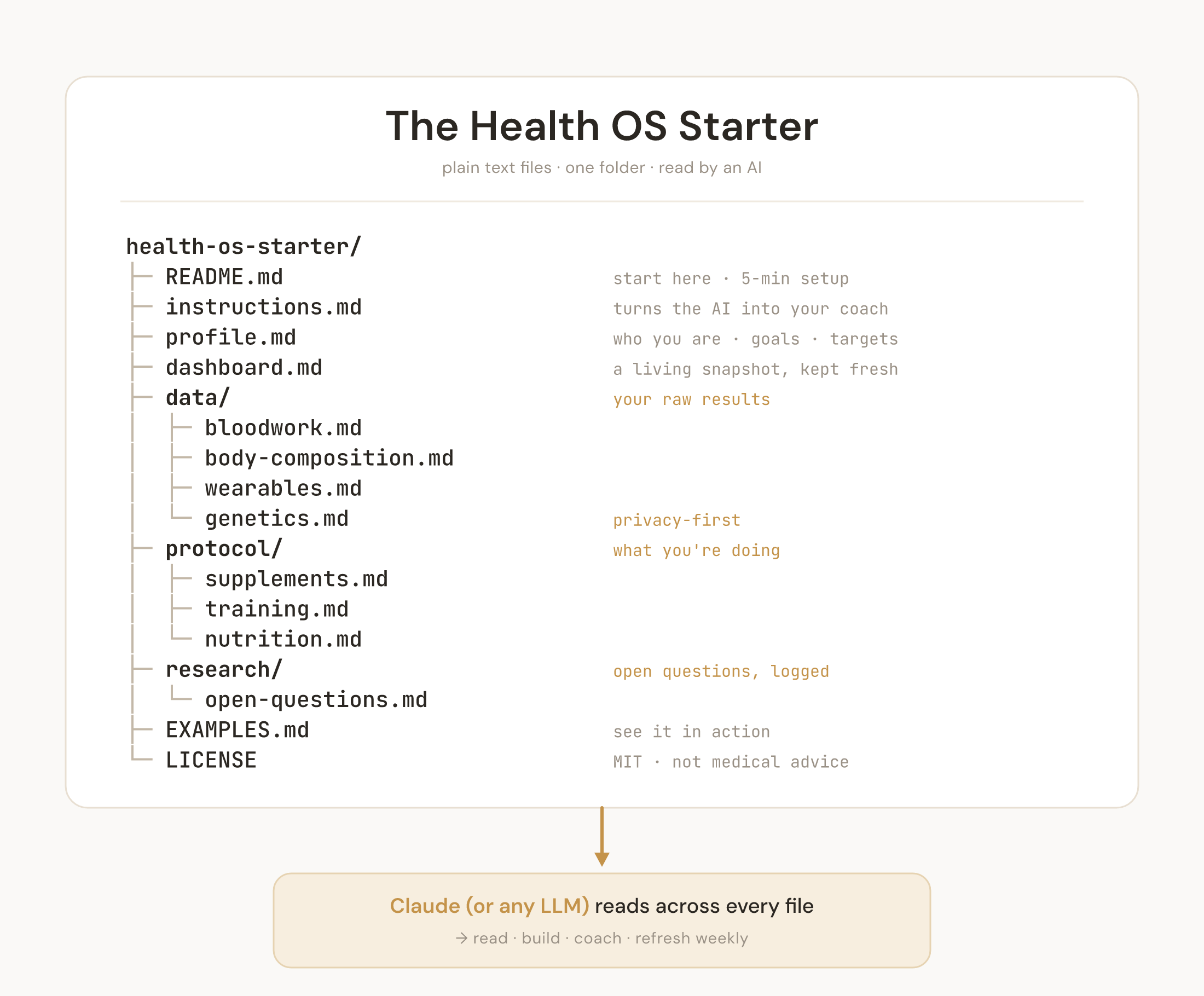
2. Make the folder. One plain file per topic:
- profile.md: you, your goals, your targets
- data/: your raw results, bloodwork, wearables, body comp, genetics
- protocol/: what you're doing, supplements, training
- instructions.md: the file that turns the AI into your coach
- dashboard.md: a snapshot it keeps updated
The simplest version looks like this:
- bloodwork.md with your latest lab values
- sleep.md with your last 30 days from Whoop or Oura
- instructions.md that says: read everything, don't invent numbers, tell me what matters and what to do next
One of those files can be this plain:
# bloodwork.md
Date: June 2026
Vitamin D: 38 (a bit low)
Iron stores: 45 (low)
Testosterone: 620
3. Add your data. Paste in what you have, lab PDFs, your Whoop or Oura, Apple Health, a body composition scan. Start with bloodwork and one wearable, add the rest later.
4. Give it the coach instructions. This file does the work: read everything first, never invent a number, cite sources, flag anything that needs a doctor. Ask for your read and it tells you where you stand, what's flagged, what to do, what to stop, what's missing. It plans and coaches too.
5. Run it weekly. New data lands, drop it in, say "give me my read." The picture gets sharper. Data you collect is a curiosity. Data something acts on every week is a coach.
I packaged the exact scaffold, the coach prompt, and example (fake) data into a free starter template. Copy it, swap in your data, and open it in your AI tool.
Get the Health OS Starter → github.com/gm-max/health-os-starterThe genome was the base layer. This is the thing that finally acts on it.
If you build one, reply and tell me what you're tracking. I read every reply, and I'll help you get yours set up.
More soon,
Max
Personal experimentation and documentation, not medical advice. Talk to a doctor before making health decisions.